

What is Hubstaff?
**Hubstaff: Time Tracking, Productivity, and Workforce Management for Modern Teams** Hubstaff is a leading time tracking and workforce productivity platform trusted by over 112,000 businesses and 2 million users across the globe. Designed for modern, remote, hybrid, and field teams, Hubstaff helps businesses streamline operations, improve accountability, and gain powerful insights into how work gets done. Whether you’re managing a growing distributed team, tracking hours for clients, or running field operations, Hubstaff offers the tools you need to operate more efficiently and make data-driven decisions. **What We Offer** - **Time Tracking Made Simple** Track time easily across desktop, web, mobile, and Chrome with lightweight apps your team will actually use. Automatically generate timesheets, monitor task progress, and track time to specific clients or projects—so you can stop guessing and start knowing where time goes. - **Productivity Monitoring** Hubstaff gives managers real-time visibility into activity levels, app and URL usage, and optional screenshots. These features help uncover inefficiencies and support high-performing teams—without micromanaging. - **GPS and Location Tracking** For field teams or mobile employees, Hubstaff includes GPS tracking and geofencing capabilities. Know when team members arrive and leave job sites, and automate time tracking based on location. - **Powerful Reporting** From weekly timesheets to productivity trends and budget tracking, Hubstaff’s robust reporting tools help you understand how work happens. Export reports easily or set up automated email deliveries for your leadership team or clients. - **Seamless Integrations** Hubstaff integrates with over 30 popular project management, accounting, and CRM tools—including Trello, Asana, Jira, Slack, QuickBooks, Salesforce, GitHub and more—so you can fit it into your existing workflow without missing a beat. - **Payroll and Invoicing** Automate payroll and invoicing based on hours worked. Hubstaff supports payments via Deel, Gusto, PayPal, Wise, Bitwage, and more. It’s perfect for teams managing contractors, freelancers, or international employees. - **Built for Teams of Any Size** From startups and agencies to enterprise operations, Hubstaff scales with your team. Use it to manage a few freelancers or coordinate hundreds of employees across time zones and continents. **Why Teams Choose Hubstaff** - Remote-first design that works wherever your team does - Intuitive UX that makes adoption fast and easy - Flexible settings to support different privacy and compliance needs - Exceptional support and onboarding help to get your team up and running quickly - Proven ROI for companies looking to boost efficiency, transparency, and accountability **Who Uses Hubstaff?** - Agencies, outsourcing providers, and professional services firms needing to track billable time and manage contractors - Remote-first companies looking to keep visibility without micromanaging - Field service teams using GPS and mobile time tracking - Tech and software teams managing sprints and project-based work - SMBs and enterprises scaling globally while staying efficient **Our Mission** At Hubstaff, we’re on a mission to help teams do their best work, no matter where they are. We believe in transparency, accountability, and giving organizations the data they need to grow confidently in a changing work environment. **Start a free 14-day trial at hubstaff.com.**
Alternatives to Hubstaff
 HMS SoftwareSpotlightHMS is the publisher of TimeControl, the world's most flexible timesheet system. TimeControl is designed to link with both… Learn more about HMS Software.
 Deltek Replicon TimeSpotlightDeltek Replicon Time provides a unified, scalable platform that connects every aspect of time, workforce, and project management… Learn more about Deltek Replicon Time.
 GetMyTimeSimple and Accurate QuickBooks Time Tracking from any device. We offer the ability for your users to clock in, track their time… Learn more about GetMyTime.
 DOVICO SoftwareDovico was founded in 1993 on the need for an engineer to track time against his client's projects. Our CEO, Yves Doucet needed… Learn more about DOVICO Software.
 TMetricTMetric is a user-friendly time-tracking app for both freelancers and big companies. Available in English and German. It… Learn more about TMetric.
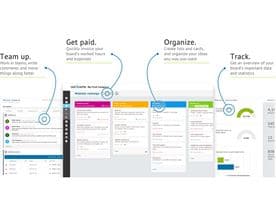 NutcacheNutcache is an all-in-one collaborative project management web app helping businesses and teams of all sizes work smarter. It… Learn more about Nutcache.
 HourDiaryStill Using Excel to track time? If time is money, make sure you're billing accurately Most service companies have realised… Learn more about HourDiary.
 CronforceCronforce is a leading provider of cloud-based business execution software, and delivers time tracking, vacations management… Learn more about Cronforce.
 Yaware.TimeTrackerYaware is time tracking and productivity monitoring software that operates in real-time to increase productivity, resource… Learn more about Yaware.TimeTracker.
 AccountSight SoftwareAccountSight is the #1 easiest, robust and most affordable end-to-end solution for professional services companies. It is a… Learn more about AccountSight Software.
Hubstaff Reviews (57)
- ★★★★★50
- ★★★★★6
- ★★★★★1
- ★★★★★0
- ★★★★★0
Review Summary
Generated using AI from real user reviews
Hubstaff receives overwhelmingly positive feedback from its user base, with the vast majority reporting smooth, straightforward time tracking and workforce management. Users consistently praise the intuitive interface, the ability to track activity and screenshots without clutter, and strong customer support responsiveness. Many reviewers mention multi-year loyalty, noting that the platform simplifies remote work oversight and provides accurate reporting and insights on team productivity.
Concerns are minimal but worth noting. One user flagged that the system can be gamed easily by staff trying to avoid tracking, with minutes sometimes being incorrectly deducted. Another noted occasional friction with Salesforce and QuickBooks integrations that could be refined. A couple of users wished for cheaper pricing tiers or additional product lines—one suggested a CRM module to compete with Monday and Salesforce.
The mobile app and clean design are recurring highlights, as is the ability to customize monitoring intensity. Users value how the tool avoids unnecessary features and stays focused on its core job. Desktop app enhancements are mentioned once as a potential improvement for administration workflows. Overall, the product delivers reliable time tracking with minimal friction, backed by responsive support.
★★★★★
Thursday, April 10, 2025
“Solid product, excellent UI and overall perfect widgets to make…”
Solid product, excellent UI and overall perfect widgets to make the interaction easier. It has been around 2 years of using hubstaff. Never disappointed me.
★★★★★
Thursday, April 10, 2025
“Overall my experience has been great working with Hubstaff.”
Overall my experience has been great working with Hubstaff.
★★★★★
Thursday, April 10, 2025
“The best experience. I love the way it does not…”
The best experience. I love the way it does not have any ads or show the timer unnecessary on the screen.
★★★★★
Thursday, April 10, 2025
“Hubstaff is very easy to use and it runs smoothly.…”
Hubstaff is very easy to use and it runs smoothly. It tracks our time accurately.
★★★★★
Thursday, April 10, 2025
“Its very good. It can capture screenshots and can track…”
Its very good. It can capture screenshots and can track hours i worked
★★★★★
Thursday, April 10, 2025
★★★★★
Thursday, April 10, 2025
★★★★★
Thursday, April 10, 2025
“Hubstaff has been perfect all around. The support from the…”
Hubstaff has been perfect all around. The support from the devs are top notch
★★★★★
Thursday, April 10, 2025
“those remote or hybrid teams, offer features like time tracking,…”
those remote or hybrid teams, offer features like time tracking, project management.
★★★★★
Thursday, April 10, 2025
“So far, we have been using Hubstaff for more than…”
So far, we have been using Hubstaff for more than 2years already and I can say, I didn't had any issues or discrepancies throughout these years!
