
HourDiary
★★★★★ 4.8 · 9 Reviews
What is HourDiary?
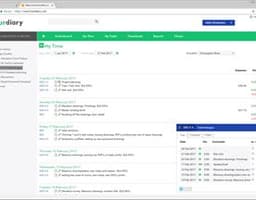
Still Using Excel to track time? If time is money, make sure you're billing accurately Most service companies have realised that spreadsheets are not the best way of monitoring and invoicing time. Excel is good, but it’s not a timesheet system. We don’t need to point out it’s limitations. The other option is to sign up for expensive time management software that has buckets of features you pay for that you’ll never use. Expensive and pointless! Hour Diary is the first cloud based application that cuts to the chase and brings you nothing but time recording and invoicing. It’s simple and it’s super easy to use.You don’t have a million useless functions and you don’t have a learning curve. We’ll even try and import your existing timesheet information into Hour Diary. We can’t guarantee this, but we’ll give it a go. We should be able to at least get your projects into Hour Diary. Try it for free for 30 days. We will not ask for credit card details until you’re happy HourDiary is the right solution for you. If you don’t like it, export your data back out to Excel. Hour Diary is currently available for as little as just £20 a month for 10 active users, but we don’t ask for your payment details until after your free 30 day period has expired.
Alternatives to HourDiary
 HMS SoftwareSpotlightHMS is the publisher of TimeControl, the world's most flexible timesheet system. TimeControl is designed to link with both… Learn more about HMS Software.
 HubstaffSpotlight**Hubstaff: Time Tracking, Productivity, and Workforce Management for Modern Teams** Hubstaff is a leading time tracking and… Learn more about Hubstaff.
 Deltek Replicon TimeSpotlightDeltek Replicon Time provides a unified, scalable platform that connects every aspect of time, workforce, and project management… Learn more about Deltek Replicon Time.
 GetMyTimeSimple and Accurate QuickBooks Time Tracking from any device. We offer the ability for your users to clock in, track their time… Learn more about GetMyTime.
 DOVICO SoftwareDovico was founded in 1993 on the need for an engineer to track time against his client's projects. Our CEO, Yves Doucet needed… Learn more about DOVICO Software.
 TMetricTMetric is a user-friendly time-tracking app for both freelancers and big companies. Available in English and German. It… Learn more about TMetric.
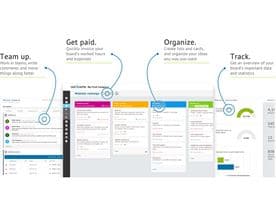 NutcacheNutcache is an all-in-one collaborative project management web app helping businesses and teams of all sizes work smarter. It… Learn more about Nutcache.
 CronforceCronforce is a leading provider of cloud-based business execution software, and delivers time tracking, vacations management… Learn more about Cronforce.
 Yaware.TimeTrackerYaware is time tracking and productivity monitoring software that operates in real-time to increase productivity, resource… Learn more about Yaware.TimeTracker.
 AccountSight SoftwareAccountSight is the #1 easiest, robust and most affordable end-to-end solution for professional services companies. It is a… Learn more about AccountSight Software.
HourDiary Reviews (9)
- ★★★★★7
- ★★★★★2
- ★★★★★0
- ★★★★★0
- ★★★★★0
Review Summary
Generated using AI from real user reviews
HourDiary earns consistent praise for delivering straightforward time tracking and invoicing without unnecessary complexity. Users consistently highlight simplicity and ease of setup, reporting that staff adopt it quickly and track time more reliably once it's in place. The software handles core workflows well: recording time, generating professional invoices, running reports on unbilled work, and tracking against budgets. Support is noted as responsive when needed.
The main friction points are narrow. Reporting flexibility is the most concrete complaint—some users need to export to Excel and build pivot tables to analyse data their way. A couple of users mention wanting the ability to restrict visibility of certain projects or rates from team members. One lighthearted note: time-saving automation via email scanning or call monitoring would be nice, though that reads more as wishful thinking than a genuine gap.
With seven five-star reviews out of nine and no serious complaints about core functionality, HourDiary works reliably for teams and freelancers who need a straightforward, accessible tool. It's strongest for users who value quick setup and professional output over deep reporting customisation.
★★★★★
Thursday, March 15, 2018
“Simple, easy to use software Pros: Simplicity. Ease of setup…”
Simple, easy to use software Pros: Simplicity. Ease of setup and use. All our staff could start using this and have been keeping their time more regularly since using it. Cons: Reporting can be a bit inflexible. I need to export to excel and then make pivot tables to analyse the data.
★★★★★
Thursday, March 15, 2018
“Simple, easy to use software Pros: Simplicity. Ease of setup…”
Simple, easy to use software Pros: Simplicity. Ease of setup and use. All our staff could start using this and have been keeping their time more regularly since using it. Cons: Reporting can be a bit inflexible. I need to export to excel and then make pivot tables to analyse the data.
★★★★★
Thursday, March 15, 2018
“Easy to use time tracking software that I can access…”
Easy to use time tracking software that I can access wherever I am. Pros: HourDiary enables me to easily record my time and then create professional looking invoices which I can send on to my clients. I can also quickly run a report to work out what time hasn't yet been billed (and the value of that work) and also monitor where I am versus any fixed quote / budget I have set. On the occasions where I have needed some extra guidance, the support helpline has been quick to respond & easy to deal with. Fantastic value for money. Cons: Would be helpful to have the ability to make certain matters / rates confidential from other users in the future.
★★★★★
Thursday, March 15, 2018
“HourDiary does exactly what it claims. Pros: It is essential…”
HourDiary does exactly what it claims. Pros: It is essential we provide professional, fully itemised timesheets & expenses to our many institutional clients. HourDiary has helped us do this and in the process saved many hours of frustration struggling with Excel. I would recommend it to any firm. Cons: If it could fill in my time sheet for me automatically by scanning my emails, monitoring my phone calls and reading my mind that would be great.
★★★★★
Thursday, March 15, 2018
“Very worthwhile We've discussed it in the office and feel…”
Very worthwhile We've discussed it in the office and feel that HourDiary is very worthwhile and has already helped us with several clients, so we would very much like to continue using it.
★★★★★
Monday, October 16, 2017
“Currently using HourDiary to track my time whilst working on…”
Currently using HourDiary to track my time whilst working on several consultancy projects. Aside from just tracking my time it allows me to create professional looking timesheet to accompany my invoices. Highly recommended.
★★★★★
Tuesday, September 5, 2017
“HourDiary does exactly what it claims. Pros: It is essential…”
HourDiary does exactly what it claims. Pros: It is essential we provide professional, fully itemised timesheets & expenses to our many institutional clients. HourDiary has helped us do this and in the process saved many hours of frustration struggling with Excel. I would recommend it to any firm. Cons: If it could fill in my time sheet for me automatically by scanning my emails, monitoring my phone calls and reading my mind that would be great.
★★★★★
Monday, May 22, 2017
“Easy to use time tracking software that I can access…”
Easy to use time tracking software that I can access wherever I am. Pros: HourDiary enables me to easily record my time and then create professional looking invoices which I can send on to my clients. I can also quickly run a report to work out what time hasn't yet been billed (and the value of that work) and also monitor where I am versus any fixed quote / budget I have set. On the occasions where I have needed some extra guidance, the support helpline has been quick to respond & easy to deal with. Fantastic value for money. Cons: Would be helpful to have the ability to make certain matters / rates confidential from other users in the future.
★★★★★
Tuesday, February 28, 2017
“We've discussed it in the office and feel that Hour…”
We've discussed it in the office and feel that Hour Diary is very worthwhile and has already helped us with several clients, so we would very much like to continue using it.
